
Adult business data security begins with who can see your client records. If those records leak, the harm lands on the people your records name. It lands on you too.
Collect less, and delete data on a date you have written down. Keep ID documents and sensitive files in a zero-knowledge password manager, not in your inbox. Give every person their own login, and keep two-factor authentication on.
This guide is for escort agencies, companionship services, independents and creators. It also suits tantric and massage practitioners, directories and adult shops. It covers what data you hold, where to keep it and how long to keep it. It also covers secure messaging. It shows how to hand a developer or agency access without handing over your business. We say “clients” for people who book you and “customers” for people who buy from you. This is not legal advice, and where the law is unclear we say so.
We have built and run websites for this sector for over a decade. We have had clients in the past who shared the password to their email account. Some switched off two-factor authentication. Some gave those details to other agencies and web developers. We strongly advise against all three. We have also seen passwords in this industry that you could guess in twenty seconds.
Why Adult Business Data Security Matters
People who book, work with or buy from you have good reason to keep that private. A leak takes that choice away from them. Some of the people who use these services hold high-profile positions. If a record leaks, it puts their reputation at risk. That raises the stakes for every record you hold.
In 2023 a security researcher found an open database belonging to a Brazilian escort service. It held verification and advertising images and videos for about 35,400 escort accounts in a 2022 folder. A 2023 folder held an estimated 33,900 more. The database also exposed client and escort email addresses and names.
In February 2026 Tenga, a sex-toy maker, told US customers a hacker had accessed an employee’s email. The inbox may have held customer names, email addresses and order or service enquiries. Tenga said the breach affected about 600 people in the United States. It then reset the employee’s credentials and turned on multi-factor authentication across its systems.
In 2016, Canadian and Australian regulators reported on the 2015 Ashley Madison breach. The breach hit about 36 million accounts. The regulators found no documented information security policies. They found plain-text passwords and encryption keys on the company’s systems. They found it kept deactivated and inactive profiles indefinitely. They also found it kept photos from paid deletions past its own 12-month limit.
Each story comes down to basics. One left a database open. One had a hacker gain access to an employee’s email account. One had no documented security policies.
AI Is Speeding Up Attacks on Websites
AI tools now find security flaws quickly. In July 2026 a researcher used AI to find a serious WordPress core flaw in about ten hours. Attackers began mass exploitation of that flaw within two days of the patch. Neither ELLIO nor Wiz reported attackers using AI.
In May 2026 Google reported a two-factor bypass flaw in an open-source web admin tool. Google has high confidence that a criminal used AI to help find the flaw. In 2025 the NCSC said AI will almost certainly shorten the time between disclosure and exploitation. It also expects skilled criminals to offer AI cyber tools as a service. That will help novice criminals, from a low base.
In 2026 the NCSC added that skilled people using AI can exploit flaws at scale and at pace. Google also reports attackers using AI models to turn public disclosures and patch delays into exploit code faster.
Google had not yet seen fully autonomous AI attacks on real targets by September 2026. The danger is speed: you have less time to patch. Patchstack counted 11,334 new WordPress vulnerabilities in 2025, and 91 per cent sat in plugins. If someone hacks your site, they reach every form entry and upload it holds.
Do these five things.
- Turn on automatic updates for WordPress core, plugins and themes. The NCSC advises you to update by default.
- Delete plugins and themes you do not use, as the WordPress hardening guide advises.
- Use two-factor and a unique password on every admin account.
- Keep regular backups of your files and your database, and test a restore.
- Add a web application firewall as an extra layer. Do not rely on it alone.
What Data You Hold
You may hold more than you realise.
| Your business | What you typically hold |
|---|---|
| Escort agencies and companionship services | ID copies, booking details, screening notes, references, deposit messages |
| Independents and creators | Client enquiries, screening documents, messages, fan or subscriber details, photos with hidden location data |
| Tantric, massage and wellness practitioners | Bookings, intake forms, health notes, consent records |
| Directories and listing platforms | Advertiser and member accounts, verification files, enquiries, logins |
| Adult shops and ecommerce brands | Names, delivery addresses, order history, email addresses, payment-method notes |
Whichever row fits you, you also hold logins to the systems that store this data.
The ICO says personal data includes names, identification numbers, location data and online identifiers such as IP addresses. Some of your data needs extra care. The ICO lists data concerning a person’s sex life as special category data. It gives no example for escort bookings. If your records show or imply something about a person’s sex life, treat them as special category data. Take legal advice on your own situation.
Two more points matter for specific niches.
- Health information. The ICO says health data includes appointment details and invoices that reveal something about someone’s health. Its examples include an osteopath clinic and physiotherapy sessions. It does not mention massage or tantric work. If you take medical history, treat it as special category data. The ICO says explicit consent must be a clear statement, oral or written, such as a ticked box. It should be separate from other consents. The ICO also says massage salons that record a client’s medical history pay the data protection fee.
- Purchase history. The ICO says profiling that infers someone’s sex life or sexual orientation creates special category data. It gives no adult-retail example. It also warns that others may infer something sensitive from data. So treat even a plain order record with care. Do not profile customers by what they buy.
Now decide what to keep. This table is a starting point.
| What you hold | Our advice | Where it should live |
|---|---|---|
| Copy of an ID | Keep it only if you can say why. A note that you checked it, with the date and result, can do the job. | A zero-knowledge vault, with a deletion date |
| Advertiser or performer verification files (directories) | We found no ICO or Ofcom text that sets a period for these. The same principles apply: collect what you need, limit staff access, set a deletion date. | A zero-knowledge vault, not the website |
| Booking and order details | Keep them for the period in your privacy policy, then delete them. Keep invoices and sales records for the periods in the tax paragraph below. | Your booking or shop system, not old email threads |
| Fan and subscriber data | Keep it in the platform or tool that collected it. Do not copy exports into spreadsheets or email. | The platform, or your mailing tool |
| Health or intake notes | Collect only what you need. This means asking for explicit consent unless another legal condition applies. | A vault, or a booking system with named accounts |
| Card details | Never store the security code. Let a payment provider take the card. | Not on your site at all |
| Form entries on your website | Do not leave them in WordPress. Delete them on a schedule. | Your booking system or vault |
| Photos you upload | Remove location data before you upload. | Your media library, once you have removed the data |
The ICO makes a similar point about age checks. It says an organisation may receive only a yes or no answer on whether someone is over 18. In many cases it does not need to see a full passport. That 2021 opinion covers children’s services. The principle still applies to you: keep the result, not the document, wherever you can.
Keep Sensitive Files in a Zero-Knowledge Vault, Not Your Inbox
Password managers such as 1Password and Keeper encrypt your files on your own device. They do this before the files reach the company’s servers. The provider cannot read them. That makes the design zero-knowledge.
We store client access details in 1Password. That includes site logins and SSH keys, the keys developers use to log in to a server. The same approach works for ID documents, verification files and intake forms. If you work alone, you still need a vault and two-factor. Keep your recovery code somewhere safe, because nobody else holds it.
- 1Password lets you add a document item or attach a file to any item. You find it by name, so name each item with a booking or order reference. 1Password encrypts everything in your account end to end. Your password and a Secret Key protect it.
- Keeper has record types for passports, driver’s licences and identity cards, plus file attachments. Its design is zero knowledge, and Keeper says it cannot assist with recovery.
Three habits make a vault work.
- Share by vault, not by message. Give each team member the vault they need and nothing more. On 1Password’s Business plan, an audit log shows who did what for 365 days.
- Protect the vault itself. The NCSC advises you to turn on two-step verification for the password manager.
- Plan for loss. 1Password cannot reset your password or Secret Key. You recover your account with a recovery code, or by asking a team administrator. Decide now who holds those.
A vault does not replace good habits. Do not leave ID in an inbox, a shared drive, a phone photo gallery or your website’s media library. Use the vault for your own logins too.
Card numbers need special care. The PCI Security Standards Council says you may not keep the card security code. That applies once the card company authorises the payment. If a client emails card details, process the payment and delete the email. Its small merchant guide gives the same advice. Then ask the client to use a payment link next time.
Set a Retention Window and Write It Down
The ICO says you must not keep personal data longer than you need it. You must also be able to justify how long. It describes a retention schedule as a list. Each entry gives a record type, its use and how long you intend to keep it.
We found no UK rule that sets a fixed period for client ID or booking records. The choice is yours. We suggest a short window, such as 90 days or 12 months. What matters is that you can say why that period fits your purpose. Write it into your privacy policy and stick to it.
Regular clients make this harder. You may want a returning client’s ID later. We found no rule that makes you keep ID for the police, so treat it as your own judgement. Say so in your privacy policy and tell the client. Take advice on the right legal basis.
Tax records follow fixed rules. If you run a limited company, you must keep accounting records for six years. The clock starts at the end of the last financial year they relate to. If you are VAT-registered, keep VAT records for at least six years. If you are a sole trader, keep records for at least five years. Count them from the 31 January deadline for that tax year. Check with your accountant, then delete personal details you no longer need.
If you employ staff, keep PAYE records for three years from the end of the tax year. Keep copies of right-to-work checks for the length of employment plus two years, then destroy them. Those rules cover staff, not clients.
Some councils also set client-record periods. Hounslow’s standard terms for special treatment licences cover massage. They told licensees to keep client records for three years. Those terms ran from April 2021 to March 2025, so check the conditions on your own licence.
If you make sexually explicit imagery for US viewers, US law may apply. It can require you to keep performer ID and age records for seven years. Take legal advice on whether it covers you. It clashes with the advice above to keep less, so decide with care.
Shops have a setting for this. In WooCommerce, the Accounts and Privacy settings let you set how long to keep inactive accounts and old orders. A blank field keeps that data forever.
A few related jobs belong here.
- List every service that handles client or customer data in your privacy policy, such as your email provider.
- Link your privacy policy next to the submit button on your forms.
- Check whether you must pay the ICO data protection fee. If you are a sole trader and use personal information, you pay it unless an exemption applies.
- If someone asks you to delete their data, you generally have one month to act. There are limits, such as legal claims.
Never Share a Login, and Never Switch Off Two-Factor
Your email account is the master key. The NCSC explains that a criminal with access to your email can reset the passwords on your other accounts. So nobody else holds your email login. That includes your developer.
Every person who needs access gets their own named account. You can then remove one person without changing everything. The ICO says you should limit access to people who need it. Take access away when they no longer need it.
The NCSC calls two-step verification one of the most effective ways to protect your accounts. A 2023 Microsoft study found it cut the risk of compromise by 99.22 per cent across the entire population. Where passwords had already leaked, the figure was 98.56 per cent. Verizon’s 2026 breach report finds credential abuse at some stage in 39 per cent of breaches.
Not every second factor is equal. Google’s 2019 research tested sign-in challenges. An SMS code stopped 76 per cent of targeted attacks. An on-device prompt stopped 90 per cent. Microsoft’s study found authenticator apps outperform SMS. Use an authenticator app, a passkey or a security key where you can.
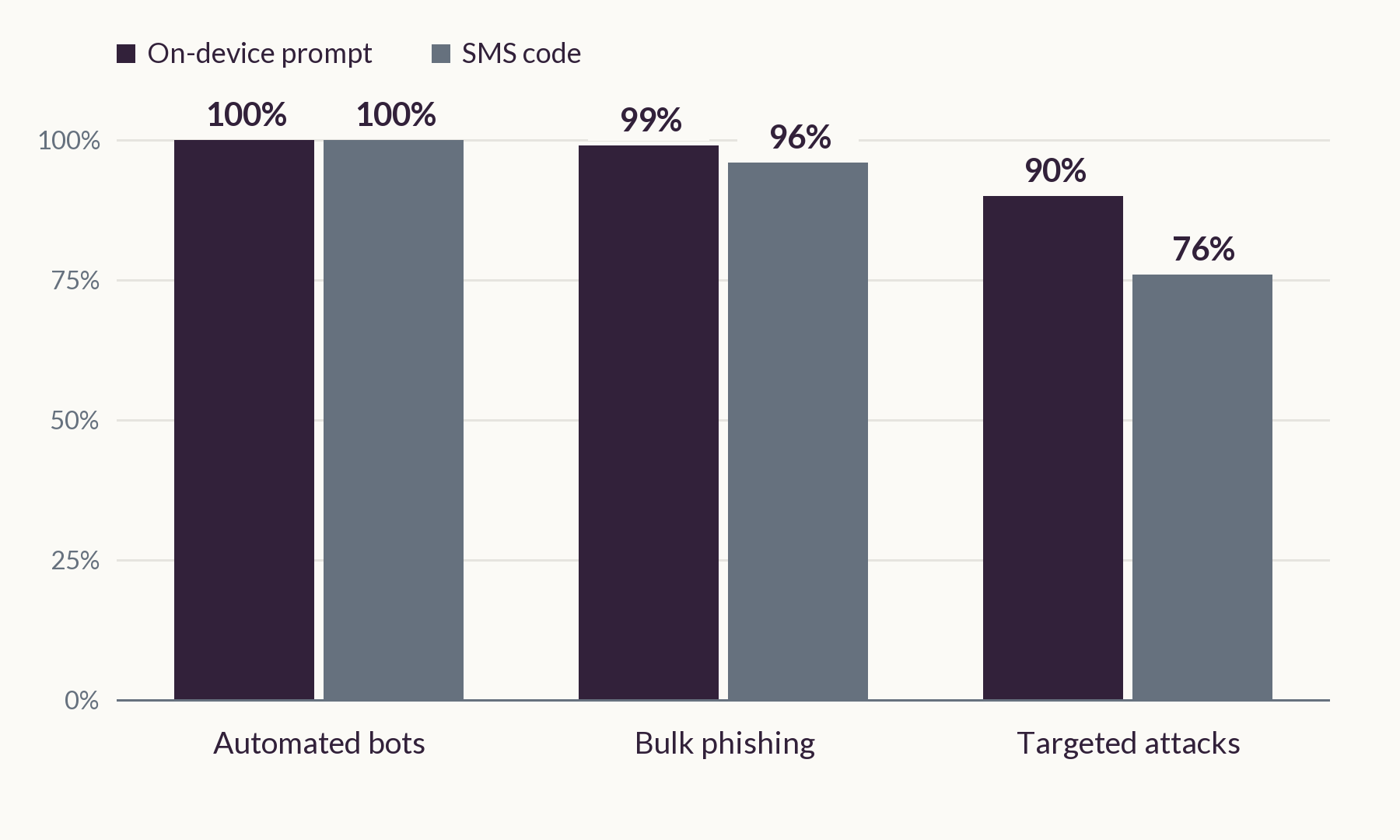
Switching two-factor off to save a few seconds at login removes that protection. Leave it on.
Hand Over Access Safely to an Agency or Developer
Follow this order every time.
- List what they need and why. That might be your website, hosting, domain registrar, DNS, email, shop and analytics. Give the lowest role that does the job. WordPress, for example, separates Administrator from Editor and Author.
- Add them as a named user. Never share your own login. WordPress has an Add New user screen. Cloudflare lets you invite members with set roles. GoDaddy’s delegate access shares a domain without passwords. Never type a password for them and send it. They set their own.
- Manage DNS through Cloudflare, not a shared login. When we host a site, we recommend that we manage its DNS in Cloudflare. If you already use Cloudflare, share access through its user management. If you do not, point your name servers at our agency’s Cloudflare account. Either way, we do not ask for your registrar login. If a previous developer holds the DNS records, ask them for an export so you lose nothing.
- Use a vault for anything you must share. 1Password can create a share link that expires when you choose. Keeper’s one-time share links run from one hour to 180 days.
- Remove access when the work ends. Keep a list of who has access. Then review it every few months, as the NCSC advises.
Get the paperwork right too. Suppose a developer, host, email provider or booking tool handles your clients’ or customers’ data. If they act on your behalf and on your instructions, the ICO calls them a processor. The ICO says a processor can be a company or an individual, for example a consultant. You need a written contract with each processor. It should require them to delete or return your data when the work ends.
You stay responsible for the data. Not every supplier is a processor, so check each case or take advice. Giving someone outside the UK remote access can also be an international transfer, which has its own rules.
For Google tools, our guide shows how we ask clients to share Google access by invitation, never by password.
Protect Client Data Inside Your Team
Your staff, contractors and agencies can see client data too. Control that access.
Give each person the access their role needs and nothing more. The ICO says to restrict access to roles that need the information. It also says to remove leavers’ access promptly, including contract staff. Train new starters in data protection before they handle personal data.
At HauteLab we keep our clients’ identities and key details from team members who do not need them.
Put a confidentiality agreement in every employment and contractor contract before anyone sees client data. Acas says an NDA can protect confidential business information and customer identities. Write clearly what it covers and who may receive it.
An NDA has limits. Acas says it cannot stop someone reporting a crime to the police or making a whistleblowing disclosure. It does not replace access controls or training. Ask an employment solicitor to draft the clause.
If your staff deliberately access or share personal data without authority, they may commit a criminal offence. The ICO has prosecuted two former employees who copied and sold personal data from their employer. Tell your team this in writing.
Do the same with every agency or supplier you hire. Use the written contract described above and add a confidentiality clause. Ask who on their team will see your data.
Choose Your Communication Channels and Stick to Them
Pick a small set of approved channels and write them down. Use only those, with every client and every team member. Do not move a conversation to a new app because someone asks. This applies whether you run an agency, work alone or run a directory.
Every extra channel adds another account to secure and another place for client data to hide. It also undermines your retention rules. The NCSC calls unapproved messaging services shadow IT. It advises simple approval routes, so people do not invent workarounds.
The ICO says staff should not usually hold customer information on personal devices or private messaging apps. It says you should have a policy. Messages that staff keep that way can fall inside a subject access request.
Write a one-page channel policy. List the approved channels, who may use them, the disappearing-message timer and what never goes in a chat. Our guide to secure client communication covers booking forms and what to do when an app bans your account.
Know What Each Channel Protects and How to Use It
| Channel | Encryption | The catch |
|---|---|---|
| End-to-end between users | WhatsApp says chats with businesses that use Cloud API lack end-to-end encryption | |
| Telegram | Secret chats only, one to one | Default chats and groups lack end-to-end encryption |
| Signal | End-to-end | You need a phone number to register |
| iMessage | End-to-end | If you use Messages in iCloud, iCloud Backup stores a copy of its key. Switch the backup off and Apple holds no copy of the new key |
| SMS | No end-to-end encryption | The NCSC lists SIM swap, SS7 attacks and handset malware |
| In transit only | Providers and servers can read it |
Set a default disappearing-message timer of 24 hours, 7 days or 90 days. Pick the shortest timer that fits your retention window. WhatsApp stops at 90 days. A recipient can still keep a message unless you veto it. Choose who can add you to groups. WhatsApp opened username reservation in June 2026. When usernames launch in your country, first-time contacts will not see your number if you enabled one. The account still ties to a phone number.
Telegram
Telegram’s privacy policy says it may disclose your IP address and phone number to authorities. That needs a valid judicial order confirming you are a suspect in criminal activity that breaks Telegram’s terms. Keep client documents and group bookings off it.
Signal
Signal encrypts every chat end to end. It hides your number from people who have not saved it. Usernames let you connect without sharing it.
Email: Encryption Helps, but It Is Not Enough
Most email travels with encryption between servers only. The provider can still read it. The NCSC advises you to use TLS and to publish SPF, DKIM and DMARC for your own domain.
End-to-end options exist. Proton Mail encrypts messages between Proton users. To anyone else it uses TLS where their server supports it, unless you use a password-protected message. Proton says its end-to-end encryption does not cover subject lines or addresses. Tuta encrypts subject lines and sender names between its users, but not email addresses or dates.
Encryption does not fix these common problems.
- Replies go back in the clear. Replies to a password-protected message go back without end-to-end encryption by default.
- Someone takes over the mailbox. After a hack, the NCSC says to check email filters and forwarding rules. It also says to enable two-step verification and sign out of all devices.
- Autocomplete picks the wrong address. The ICO suggests delayed sending and disabling auto-complete for sensitive email.
- Phishing steals the login. The NCSC puts passkeys first for small organisations.
- Old email sits in the inbox for years. Delete it on your retention schedule.
Never email ID documents. Share them from your vault with an expiring link.
Secure the Phone in Your Pocket
- Protect every device you use for work, including personal ones. The NCSC advises a PIN or biometrics, automatic updates and official app stores.
- Hide message previews on the lock screen. On iPhone, open Settings, then Notifications, then Show Previews and pick When Unlocked or Never.
- Turn on remote wipe. Google’s Find Hub can lock or reset a lost Android phone that is online.
- Check where your chat backups go and who can open them. Apple no longer offers Advanced Data Protection to new UK users.
- Where you can, keep client details off staff members’ personal phones.
- Use a separate phone or number for work.
Group Chats Leak Quietly
A group chat holds client details for many people at once. Keep client details out of group chats. Use one-to-one chats or your booking system.
- Anyone in a group can forward or photograph a message.
- A member who leaves keeps the history they already received.
- Someone you add by mistake sees every later message.
- Two admins keep the group running if one leaves.
Review who is in each group every quarter. Remove leavers the day they go.
What Your Website Should and Should Not Store
Your website can hold more client data than you know. Ask your developer seven questions.
- Does the form keep every entry? WPForms stores entries by default. You can switch that off under Settings, General, Advanced. Be careful: the data then sits in notification emails, so keep sensitive fields off the form. Gravity Forms can delete entries after a set number of days.
- Can anyone open uploaded files? By default, WPForms leaves uploaded files open to anyone who can reach the file. You can turn on file access restrictions, which need a paid licence.
- Do your photos carry location data? One plugin author warns that WordPress strips it from generated sizes, but the original upload may keep it. Phone photos can carry GPS coordinates. Strip it before you upload.
- Do backups and test copies contain live client or customer data? If they do, delete it from the copies.
- Does your developer hash passwords and never store them in plain text? The ICO says never store them in plain text.
- Does your analytics tool collect more than it needs? Choose one that sets no cookies, keeps no raw IP addresses and reports totals, not individual visits. From February 2026, UK law allows some analytics without consent. The ICO explains the strict conditions, including a free opt-out. Going cookie-free does not exempt you, because UK rules also cover scripts that read or store device information. Hashing an IP address still means processing it, so your privacy notice should cover your analytics. Tools that record individual visits need consent.
- Do client details reach analytics, a CRM or an AI tool? Google’s rules say no personal data such as email addresses or personal mobile numbers may reach Analytics. Keep client names and booking details out of AI tools too. Our guide on how not to use AI for your escort agency covers redacting names and numbers.
If you run a shop, know what it keeps. WooCommerce stores customer names, email addresses and phone numbers in your host’s database. It also stores billing and, optionally, shipping addresses, and order history. By design its official gateways never store the card number or security code.
If you check ages, collect only what you need to confirm age. In March 2026, Ofcom and the ICO gave an example for a service with pornographic content. It collects only what is strictly necessary and tells people how long it keeps the data. Do not ask a booking form to carry ID documents unless you know where each file goes.
Protect Your Mailing List
If you run a mailing list, never send to it using CC. In 2023 the ICO reprimanded the Patient and Client Council, a Northern Ireland health body. It had emailed 15 panel members with their addresses in CC. Each recipient could infer the others had experience of gender dysphoria. A list of your clients works the same way: every address shows who uses you. The ICO also says BCC alone is not enough for sensitive email. Use a mailing tool, ask new subscribers to confirm their address, and keep your own copy of the list.
Tell Your Clients What You Do
Your clients and customers will want to know whether their data is safe. Answer it on your booking or checkout page. Say what you keep, where you keep it and when you delete it. It shows you have done your due diligence.
If Something Goes Wrong
Act in this order.
- Change the affected passwords and remove unknown access.
- Work out what the breach exposed and who it affects.
- If the breach is notifiable, report it to the ICO within 72 hours of becoming aware of it.
- If the breach puts people at high risk, tell them directly and without undue delay.
- Record the breach, even if you decide not to report it.
If someone threatens to publish stolen data or intimate images unless you pay, do not pay. The National Crime Agency warns that paying does not guarantee the threats stop. Try not to delete messages, images or bank details, because police may need them as evidence. Report it to your local police on 101. Call 999 if you or anyone else is at immediate risk of harm.
The NCSC and UK law enforcement do not encourage payment of ransom demands. Paying gives no guarantee that you get your data back, and it can mark you out for repeat targeting.
The steps above follow the ICO’s guide to personal data breaches. If someone has compromised your website, our guide to recovering from a negative SEO attack covers the clean-up.
A Note for Australian Readers
If your Australian business turns over A$3 million or less, the Privacy Act mostly does not cover you. Some small businesses fall inside the Act whatever their turnover. The exceptions include businesses that trade in personal information and health service providers. We found no statement from the OAIC on whether the Act covers an adult business. Check the OAIC guidance for your own case. The habits in this guide protect your clients whether or not the Act applies.
Your Quarterly Access and Data Check
Put this in your diary every three months.
- Who has access to your website, email, domain, shop and analytics? Remove anyone who no longer needs it.
- Do you use two-factor on every account, including your password manager?
- Which IDs and intake forms have passed their deletion date?
- Which form entries and old orders are still sitting on your site?
- Do you still use only your approved channels, and who is in each group chat?
- Are WordPress core, plugins and themes up to date, and have you deleted the unused ones?
- Have all leavers lost access, and has every new starter signed a confidentiality agreement?
- Which linked devices can read your WhatsApp and Signal chats?
- Does your privacy policy still match what you do?
Not sure whether your site keeps more than it should? Ask us and we will tell you straight. You can also read about our hosting and care plans.
Keep up with the latest in adult marketing
Genuinely useful tips, tricks and news that will impact your adult business.
No generic rubbish that you already know! We hate spam as much as you.
By submitting this form, you agree to allow HauteLab to store and process the data that you have provided in accordance with our privacy policy.

We Help Ambitious Adult Brands Launch, Grow & Thrive.
At HauteLab, we have built a unique, systemised approach to marketing, design, and development for businesses in the luxury adult niche. Providing you with a one-stop solution to launch, market and maintain your project.
Let's talk